
Virginia Respite Reporting
Overview
In Virginia, Respite care plan items are usually assigned on an as-needed/PRN basis in the DMAS97AB. In other words, care plan items for Respite are usually reported as needed during Respite. (You must always report at least 1 Respite care plan item if you provide Respite service.)
In the mobile app, you will use the drop-down list to report any Respite items. But for telephony, to avoid having to listen to a long list, you can simply use a code to quickly report any care plan item that was completed during Respite.
To summarize,
For Respite in Virginia, report Respite items Manually
To report Respite items in TELEPHONY, use care plan CODES.
To report Respite items in the MOBILE APP, use the DROP-DOWN option.
You must always report at least 1 Respite item if you work Respite.
Mobile app Clock-in/out with Drop-Down List in Virginia
The process of reporting Respite in the mobile app is effectively the same as with any visit type. The only difference is that you'll use the drop-down option to report the as-needed care plan items for Respite during departure.
Reporting Arrival - No Change
- To clock in, click the Report Arrival button
- Once you Report Arrival you will be asked to accept the time
- You will then see a message confirming your arrival and telling you your expected departure time
Reporting Departure
- To clock out, click on “visits” and then “Report Departure”
- Once you Report Departure you will be asked to accept the time
- You will then see a message confirming your arrival and telling you your expected departure time
- Report care plan items as needed
-
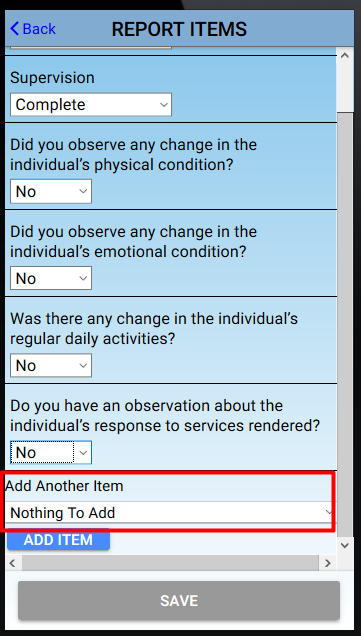
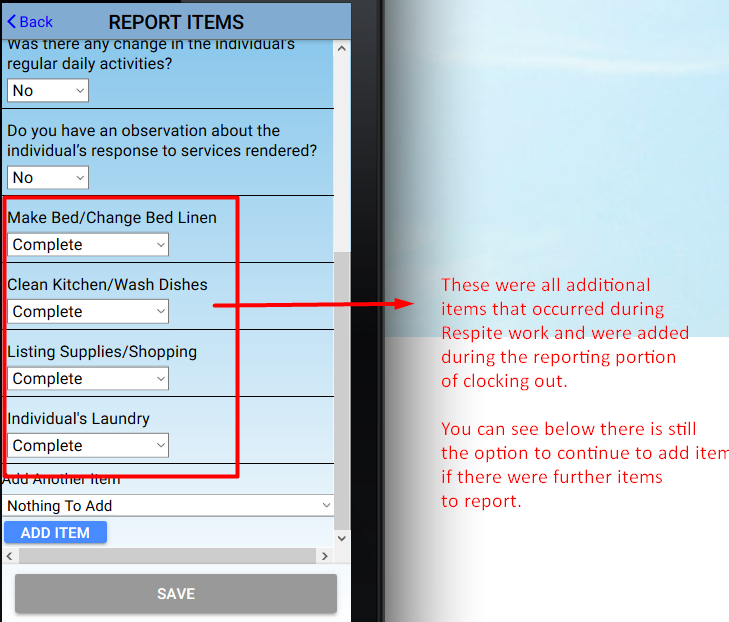
If you are providing Respite services, report any additional care plan items by selecting the drop-down option at the bottom of the Report Items page and add the appropriate Respite care plan item(s)
-
You can add as many items as you need to add
- Collect signatures and report concerns if needed
- You will then be asked if you are sure you want to report departure at this time. Click “submit” if you would like to continue with your clock out.
- Once you see the success message you can navigate back to the home page
Telephony Clock-in/out with Care Plan Task Codes in Virginia
The process of reporting Respite in telephony is effectively the same as with any visit type. The only difference is that you'll use codes to report the as-needed care plan items for Respite.
To clock in and out with telephony and report care plan task codes for Respite,
- Arrive at the client’s residence
- Report arrival via telephony from the client’s phone number (example call below)
- Please enter your user ID followed by # sign.
- Please enter your PIN followed by # sign (if you have one).
- To select X am arrival, press 1. Press 99 to hear your schedule for tomorrow.
- Arrival time is X pm. You should complete your visit at X pm.
- Your arrival has been reported. Thank you.
- Complete your visit
- Report departure, including care plan items, via telephony from the client’s phone number (example call below)
- Please enter your user ID followed by # sign.
- Please enter your PIN followed by # sign.
- To select departure, press 1. Press 99 to hear your schedule for tomorrow.
- Departure time is X pm.
-
Please report the value or status of the following items:
- [Item] is complete, press 1; if not needed today, press 2; if client refused, press 3
- Repeat as needed
-
TASK CODE REPORTING
- Do you have care plan item codes to report? Press 1 for yes; press 2 for no.
- [Press 1 to report codes]
- Please enter two-digit task code or press 0 followed by # sign if finished.
-
[Enter code, such as 01, then #]
- [Repeat as needed to report all Respite care plan items]
- Care plan item added is complete/partial bath.
- Please enter two-digit task code or press 0 followed by # sign if finished.
- [Enter code, such as 0# if finished]
- If care plan item status are acceptable, press 1. To re-enter care plan item status, press 2.
- If care plan item status are acceptable, press 1; to re-enter care plan item status, press 2.
- Are there any concerns you’d like to share with the office about the patient’s condition? Press 1 for yes or 2 for no.
- Your departure has been successfully reported. Thank you.
- Depart the client visit location (do not leave until departure is reported)
Virginia Task Codes for Telephony Reporting
01 Complete/Partial Bath
02 Dress/Undress
03 Assist with Toileting
04 Transferring
05 Personal Grooming
06 Assist with Eating/Feeding
07 Ambulation
08 Turn/Change Position
09 Vital Signs
10 Assist with Self-Admin. Medication
11 Bowel/Bladder
12 Wound Care
13 Range of Motion (ROM)
14 Supervision
15 Prepare Breakfast
16 Prepare Lunch
17 Prepare Dinner
18 Clean Kitchen/Wash Dishes
19 Make/Change Bed Linen
20 Clean Areas Used by Individual
21 Listing Supplies/Shopping
22 Individual’s Laundry
23 Medical Appointments
24 Work/School/Social
25 Other
26 Did you observe any change in the individual’s physical condition?
27 Did you observe any change in the individual’s emotional condition?
28 Was there any change in the individual’s regular daily activities?
29 Do you have an observation about the individual’s response to services rendered?
30 Money Management